JDBC学习笔记

JDBC 简介

JDBC 快速入门

步骤

1
2
3
4
5
6
7
8
9
10
11
12
13
14
15
16
17
18
19
20
21
22
23
24
25
26
27
28
29
30
31
32
33
34
35
36
37
package com.company.jdbc;  

import java.sql.Connection;
import java.sql.DriverManager;
import java.sql.Statement;

/**
* JDBC步骤
*/
public class JDBCDemo {
public static void main(String[] args) throws Exception {
// 1. 注册驱动
Class.forName("com.mysql.cj.jdbc.Driver");

// 2.获取连接
String url = "jdbc:mysql://127.0.0.1:3306/Music";
String username = "root";
String password = "ckwj";
Connection conn = DriverManager.getConnection(url, username, password);

// 3. 定义SQL语句
String sql = "update account set money = 3000 where id = 1";

// 4. 获取执行sql的对象
Statement stmt = conn.createStatement();

// 5. 执行SQL
int count = stmt.executeUpdate(sql); // 返回值,受影响的行数

// 6. 处理结果
System.out.println(count);

// 7. 释放资源
stmt.close();
conn.close();
}
}
# JDBC API 详解 ## DriverManager 1. 注册驱动s

  1. 获取数据库连接

Connection (数据连接对象)

  1. 获取执行SQL的对象

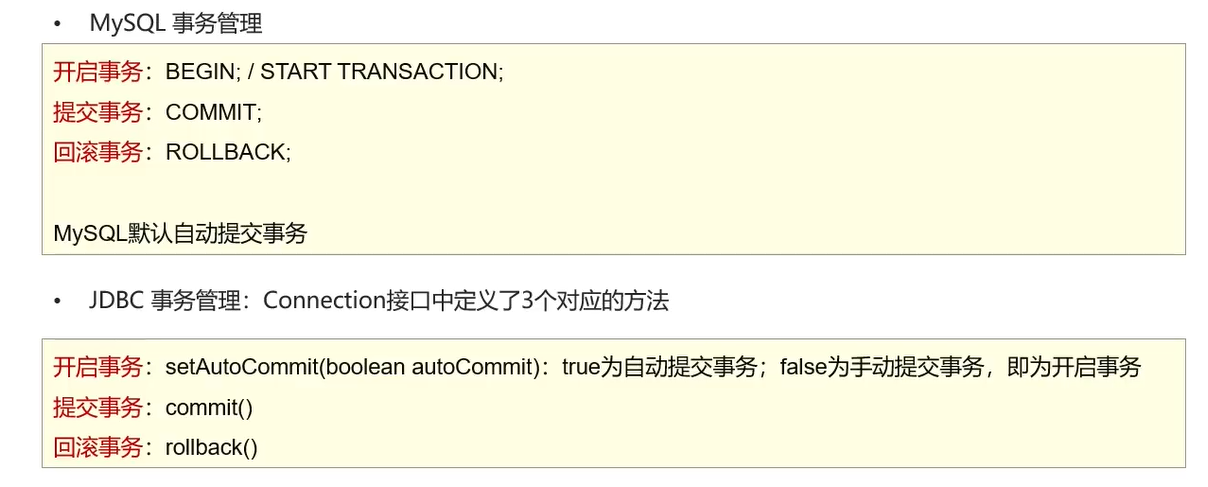
  2. 事务管理

    1
    2
    3
    4
    5
    6
    7
    8
    9
    10
    11
    12
    13
    14
    15
    16
    17
    18
    19
    20
    21
    22
    try {  
    // 开事务
    conn.setAutoCommit(false);

    // 5. 执行SQL
    int count1 = stmt.executeUpdate(sql1); // 返回值,受影响的行数
    // 6. 处理结果
    System.out.println(count1);

    int num = 3 / 0;

    int count2 = stmt.executeUpdate(sql2);
    System.out.println(count2);

    // 提交
    conn.commit();

    } catch (Exception e) {
    // 回滚
    conn.rollback();
    e.printStackTrace();
    }
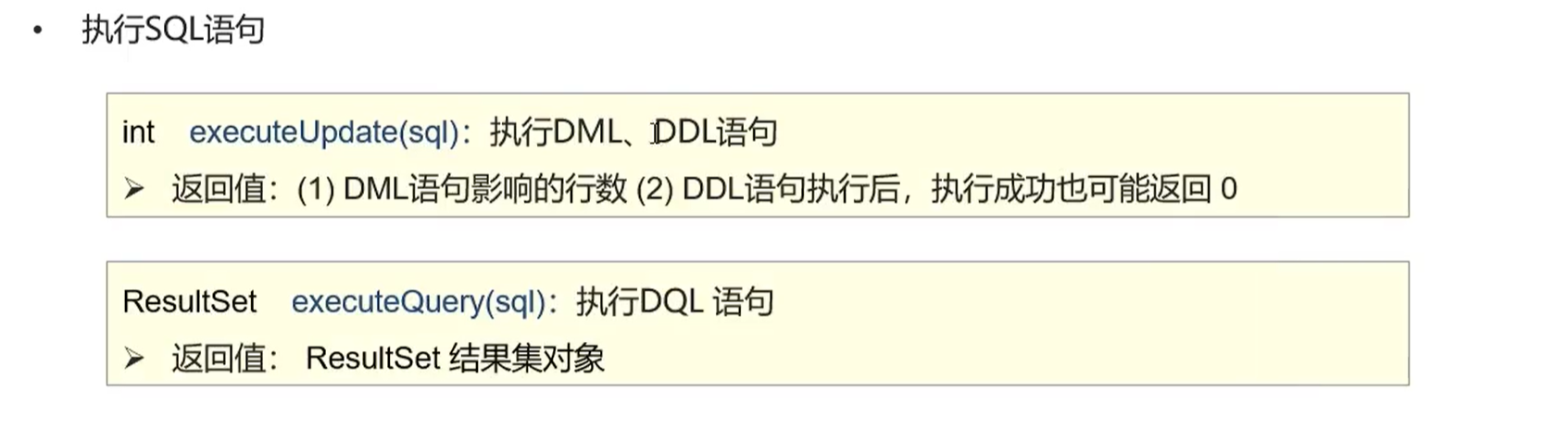
    ## Statement

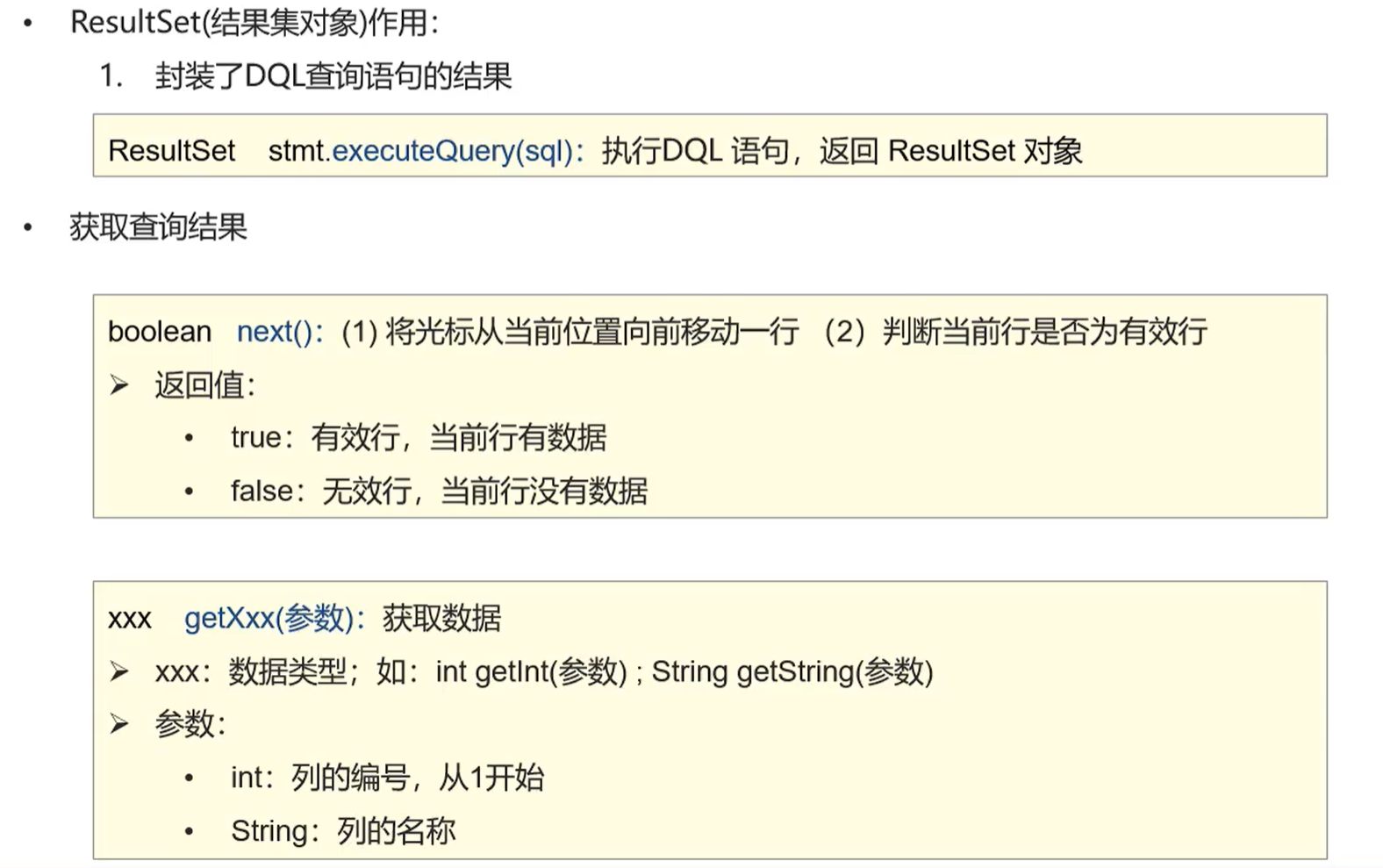
ResultSet

查询表数据,封装到Java对象中,并且存储到ArrayList集合中

1
2
3
4
5
6
7
8
9
10
11
12
13
14
15
16
17
18
19
20
21
22
// 创建pojo包 (Plain Ordinary Java Object),存放实体类
public class Account{}

/**
* 1. 定义实体类Account
* 2. 查询数据,封装到Account对象中
* 3. 将Account对象存入ArrayList集合中
*
*/
List<Account> list = new ArrayList<>();

// 6. 处理结果
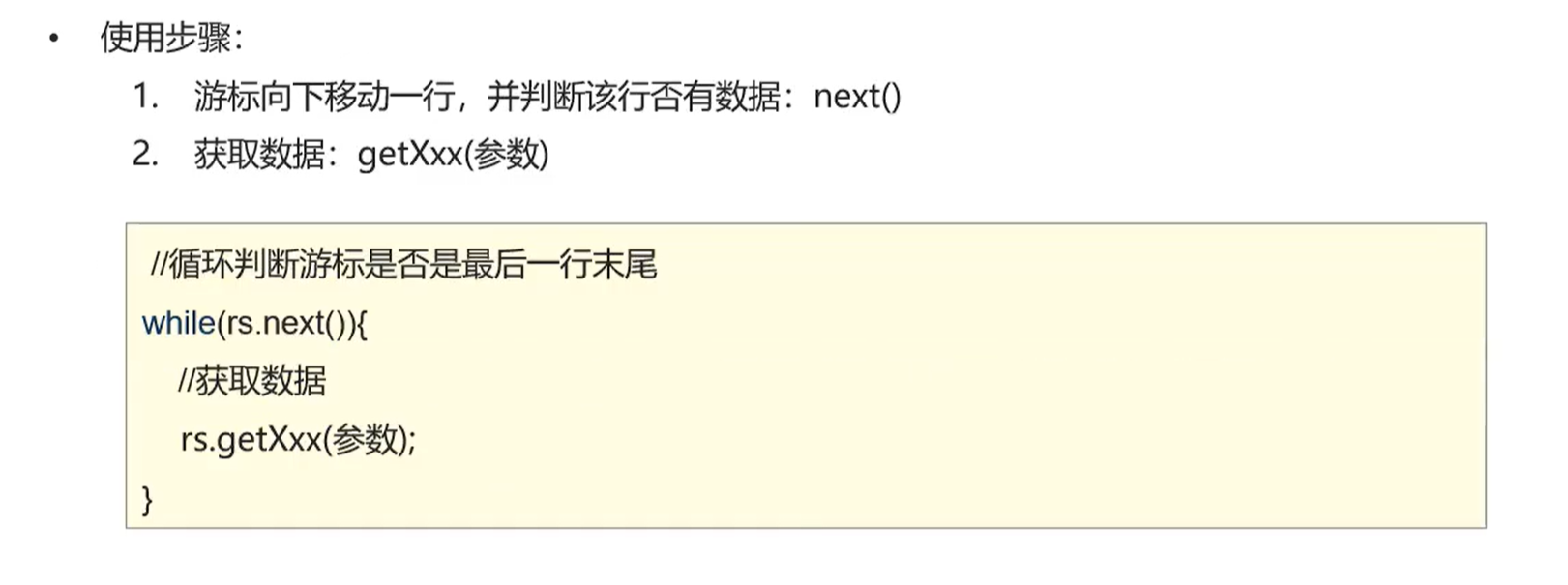
while (rs.next()) {
int id = rs.getInt("id");
String name = rs.getString(2);
double money = rs.getDouble(3);
Account account = new Account(id, name, money);
list.add(account);
}

System.out.println(list);

## PreparedStatement - 作用:预编译SQL语句并执行:预防SQL注入问题 - SQL注入:通过操作输入来修改事先定义好的SQL语句,用以达到执行代码对服务器进行攻击的方法
1
2
- 完成用户登录
select * from tb_user where username = 'zhangsan' and password = '123';
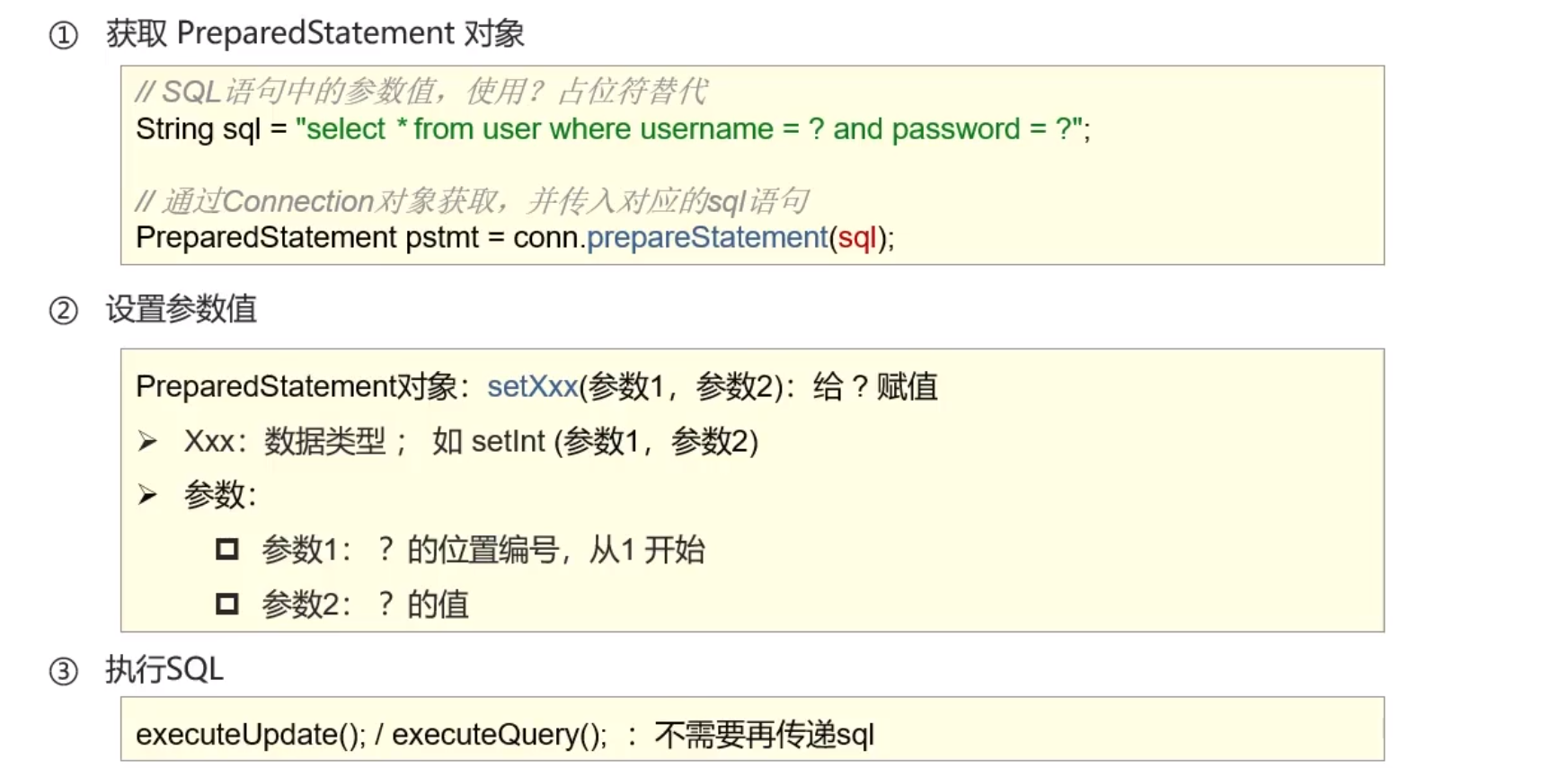
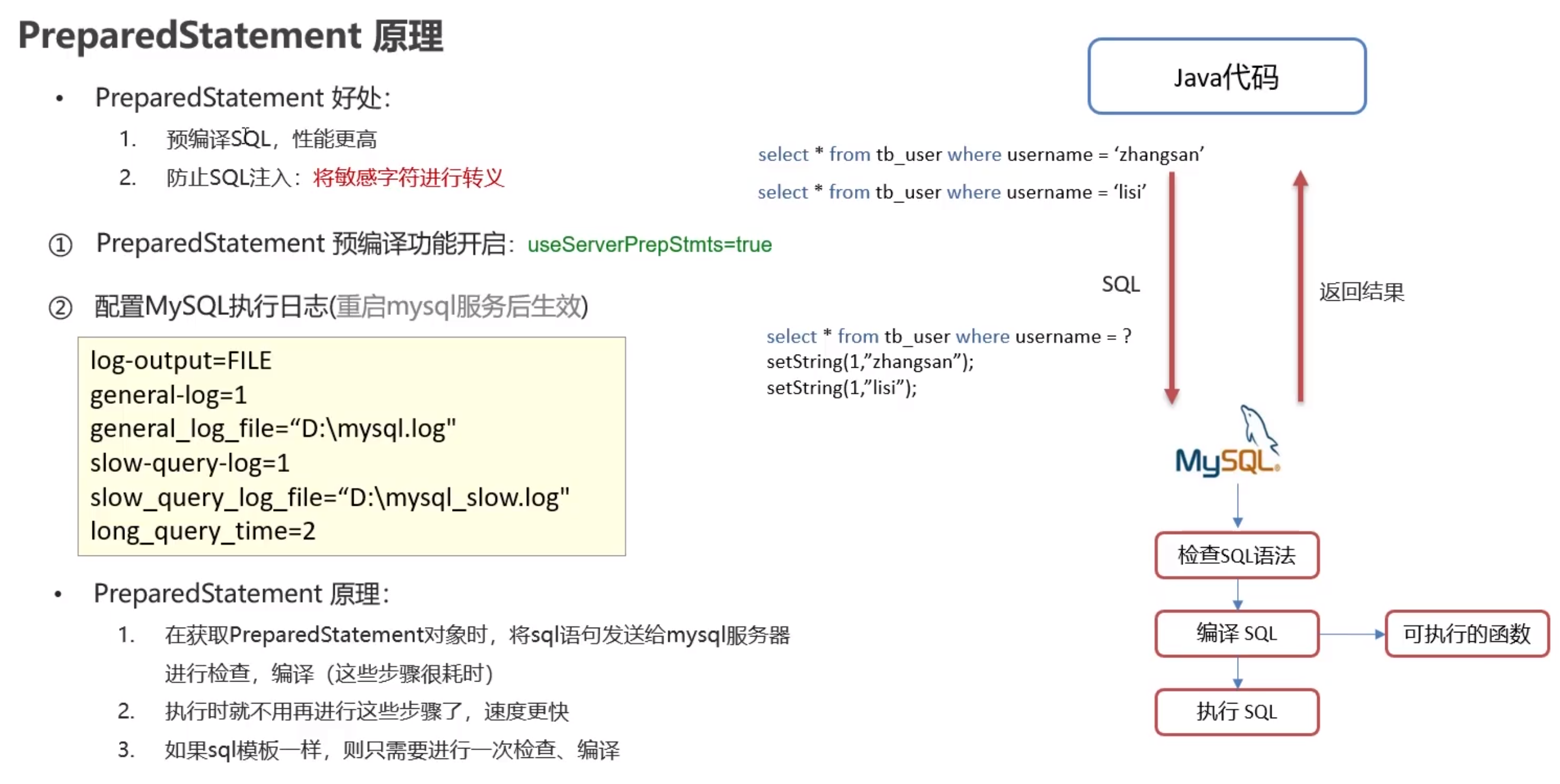
' or '1' = '1 这段字符串里的单引号被转义,不会改变原sql的语义 开启预编译后,日志才有 Prepare(相同一次) 和 Excute (多条多次), 否则直接 Query
数据库连接池

简介

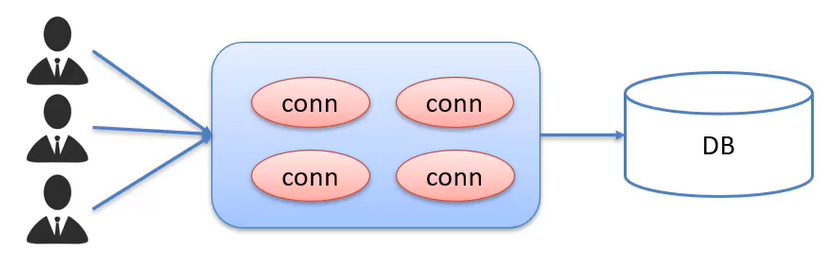
  • 数据库连接池是一个容器,负责分配、管理数据库连接(Connection)
  • 允许应用程序重复使用一个现有的数据库连接,而不是重新建立一个
  • 释放空闲时间超过最大空闲时间的数据库连接,来避免因为释放数据库连接而引起的数据库连接遗漏
  • 好处:1. 资源重用;2. 提升系统响应速度;3. 避免数据库连接遗漏 ## 实现
  • 标准接口: DataSource
    • 功能:获取连接 Connection getConnection()
  • 常用数据库连接池
    • DBCP
    • C3P0
    • Druid
  • Druid(德鲁伊)
    • Druid连接池是阿里巴巴开源的数据库连接池项目
    • 功能强大,性能优秀,是Java语言最好的数据库连接池之一

Druid使用步骤

  1. 导入jar包 druid-1.2.9.jar 官网
  2. 定义配置文件
    1
    2
    3
    4
    5
    6
    7
    8
    9
    10
    driverClassName=com.mysql.cj.jdbc.Driver  
    url=jdbc:mysql:///Music?useSSL=false&useServerPrepstmt=true
    username=root
    password=ckwj
    # 初始化连接数量
    initialSize=5
    # 最大连接数
    maxActive=10
    # 最大等待时间
    maxWait=3000
  3. 加载配置文件
  4. 获取数据库连接池对象
  5. 获取连接
    1
    2
    3
    4
    5
    6
    7
    8
    9
    10
    11
    12
    13
    14
    15
    16
    17
    18
    19
    20
    21
    22
    23
    24
    25
    26
    27
    28
    29
    30
    package com.company.druid_;  

    import com.alibaba.druid.pool.DruidDataSourceFactory;

    import javax.sql.DataSource;
    import java.io.FileInputStream;
    import java.sql.Connection;
    import java.util.Properties;

    /**
    * 数据库连接池 Demo
    */public class DruidDemo {
    public static void main(String[] args) throws Exception {
    // 1. 导入jar包

    // 2. 定义配置文件

    // 3. 加载配置文件
    Properties prop = new Properties();
    // System.out.println(System.getProperty("user.dir"));
    prop.load(new FileInputStream("src/druid.properties"));

    // 4. 获取连接池对象
    DataSource dataSource = DruidDataSourceFactory.createDataSource(prop);

    // 5. 获取数据库连接 Connection
    Connection connection = dataSource.getConnection();
    System.out.println(connection);
    }
    }

增删改查练习

  1. 获取Connection
  2. 定义SQL
  3. 获取PrepareStatement对象 4.设置参数
  4. 执行SQL
  5. 处理数据
  6. 释放资源

查找

1
2
3
4
5
6
7
8
9
10
11
12
13
14
15
16
17
18
19
20
21
22
23
24
25
26
27
28
29
30
31
32
33
34
35
36
37
38
39
40
41
42
43
44
45
46
47
48
49
50
51
52
53
54
55
56
57
58
59
60
61
62
63
64
65
66
67
68
69
70
71
72
73
74
75
76
package com.company.example;  

import com.alibaba.druid.pool.DruidDataSourceFactory;
import com.company.pojo.Brand;
import org.junit.Test;

import javax.sql.DataSource;
import java.io.FileInputStream;
import java.sql.Connection;
import java.sql.PreparedStatement;
import java.sql.ResultSet;
import java.util.ArrayList;
import java.util.List;
import java.util.Properties;

/**
* 品牌数据的增删改查操作
*/

public class BrandTest {
/**
* 查询所有
* 1. SQL: select * from tb_brand;
* 2. 参数: 不需要
* 3. 结果:List<Brand>
*/
@Test
public void testSelectAll() throws Exception {
// 1. 获取Connection
// 1.1 加载配置文件
Properties prop = new Properties();
prop.load(new FileInputStream("src/druid.properties"));

// 1.2 获取连接池对象
DataSource dataSource = DruidDataSourceFactory.createDataSource(prop);

// 1.3 获取数据库连接 Connection
Connection conn = dataSource.getConnection();

// 2. 定义SQL
String sql = "select * from tb_brand";

// 3. 获取pstmt对象
PreparedStatement pstmt = conn.prepareStatement(sql);

// 4. 设置参数

// 5. 执行SQL
ResultSet rs = pstmt.executeQuery();

// 6. 处理结果
List<Brand> brands = new ArrayList<>();
Brand brand = null;
while (rs.next()) {
// 获取数据
int id = rs.getInt("id");
String brandName = rs.getString("brand_name");
String companyName = rs.getString("company_name");
int ordered = rs.getInt("ordered");
String description = rs.getString("description");
int status = rs.getInt("status");

// 封装Brand对象
brand = new Brand(id, brandName, companyName, ordered, description, status);

// 装载集合
brands.add(brand);
}
System.out.println(brands);

// 7. 释放资源
rs.close();
pstmt.close();
conn.close();
}
}

添加

1
2
3
4
5
6
7
8
9
10
11
12
13
14
15
16
17
18
19
20
21
22
23
24
25
26
27
28
29
30
31
32
33
34
35
36
37
38
39
40
41
42
43
44
45
46
47
48
49
50
/**  
* 添加
* 1. SQL: insert into tb_brand(brand_name, company_name, ordered, description, status) values (?, ?, ?, ?);
* 2. 参数: 需要,除了 id 外的所有信息
* 3. 结果:Boolean
*/
@Test
public void testAdd() throws Exception {
// 接收页面提交的参数
String brandName = "魅族";
String company = "魅族科技有限公司";
int ordered = 150;
String description = "温润如玉";
int status = 1;

// 1. 获取Connection
// 1.1 加载配置文件
Properties prop = new Properties();
prop.load(new FileInputStream("src/druid.properties"));

// 1.2 获取连接池对象
DataSource dataSource = DruidDataSourceFactory.createDataSource(prop);

// 1.3 获取数据库连接 Connection
Connection conn = dataSource.getConnection();

// 2. 定义SQL
String sql = "insert into tb_brand(brand_name, company_name, ordered, description, status) values (?, ?, ?, ?, ?)";

// 3. 获取pstmt对象
PreparedStatement pstmt = conn.prepareStatement(sql);

// 4. 设置参数
pstmt.setString(1, brandName);
pstmt.setString(2, company);
pstmt.setInt(3, ordered);
pstmt.setString(4, description);
pstmt.setInt(5, status);

// 5. 执行SQL
int count = pstmt.executeUpdate();

// 6. 处理结果
if (count > 0) System.out.println("successful");
else System.out.println("failed");

// 7. 释放资源
pstmt.close();
conn.close();
}

修改

1
2
3
4
5
6
7
8
9
10
11
12
13
14
15
16
17
18
19
20
21
22
23
24
25
26
27
28
29
30
31
32
33
34
35
36
37
38
39
40
41
42
43
44
45
46
47
48
49
50
51
52
53
54
55
56
57
/**  
* 修改
* 1. SQL:
update tb_brand set brand_name = ?, company_name = ?, ordered = ?, description = ?, status = ? where id = ?; * 2. 参数: 需要, Brand对象所有数据
* 3. 结果:Boolean
*/
@Test
public void testUpdate() throws Exception {
// 接收页面提交的参数
String brandName = "魅族";
String company = "珠海小厂";
int ordered = 1500;
String description = "青年良品";
int status = 0;
int id = 4;

// 1. 获取Connection
// 1.1 加载配置文件
Properties prop = new Properties();
prop.load(new FileInputStream("src/druid.properties"));

// 1.2 获取连接池对象
DataSource dataSource = DruidDataSourceFactory.createDataSource(prop);

// 1.3 获取数据库连接 Connection
Connection conn = dataSource.getConnection();

// 2. 定义SQL
String sql = "update tb_brand \n" +
" set brand_name = ?,\n" +
" company_name = ?,\n" +
" ordered = ?,\n" +
" description = ?,\n" +
" status = ? \n" +
" where id = ?";

// 3. 获取pstmt对象
PreparedStatement pstmt = conn.prepareStatement(sql);

// 4. 设置参数
pstmt.setString(1, brandName);
pstmt.setString(2, company);
pstmt.setInt(3, ordered);
pstmt.setString(4, description);
pstmt.setInt(5, status);
pstmt.setInt(6, id);

// 5. 执行SQL
int count = pstmt.executeUpdate();

// 6. 处理结果
System.out.println(count > 0);

// 7. 释放资源
pstmt.close();
conn.close();
}

删除

  1. 编写SQL语句
    1
    delete from tb_brand where id = ?;
  2. 是否需要参数? 需要 id
  3. 返回结果如何封装? boolean
    1
    2
    3
    4
    5
    6
    7
    8
    9
    10
    11
    12
    13
    14
    15
    16
    17
    18
    19
    20
    21
    22
    23
    24
    25
    26
    27
    28
    29
    30
    31
    32
    33
    34
    35
    @Test  
    public void testDelete() throws Exception {
    // 接收页面提交的参数
    int id = 4;

    // 1. 获取Connection
    // 1.1 加载配置文件
    Properties prop = new Properties();
    prop.load(new FileInputStream("src/druid.properties"));

    // 1.2 获取连接池对象
    DataSource dataSource = DruidDataSourceFactory.createDataSource(prop);

    // 1.3 获取数据库连接 Connection
    Connection conn = dataSource.getConnection();

    // 2. 定义SQL
    String sql = "delete from tb_brand where id = ?;";

    // 3. 获取pstmt对象
    PreparedStatement pstmt = conn.prepareStatement(sql);

    // 4. 设置参数
    pstmt.setInt(1, id);

    // 5. 执行SQL
    int count = pstmt.executeUpdate();

    // 6. 处理结果
    System.out.println(count > 0);

    // 7. 释放资源
    pstmt.close();
    conn.close();
    }

JDBC学习笔记
https://nessaj7.github.io/2022/04/29/54cba0b373d6.html
作者
kuhn
发布于
2022年4月29日
许可协议